Removing 1.2 Seconds of Render Blocking with Dynamic Naver Map API Loading
Web | December 4, 2025
This post documents how we removed render blocking caused by the Naver Map API and improved Moitz's initial loading performance.
Introduction
Performance optimization is a core frontend concern for delivering a better web experience. While measuring Moitz, we found a bottleneck that kept its Lighthouse performance score at 46.
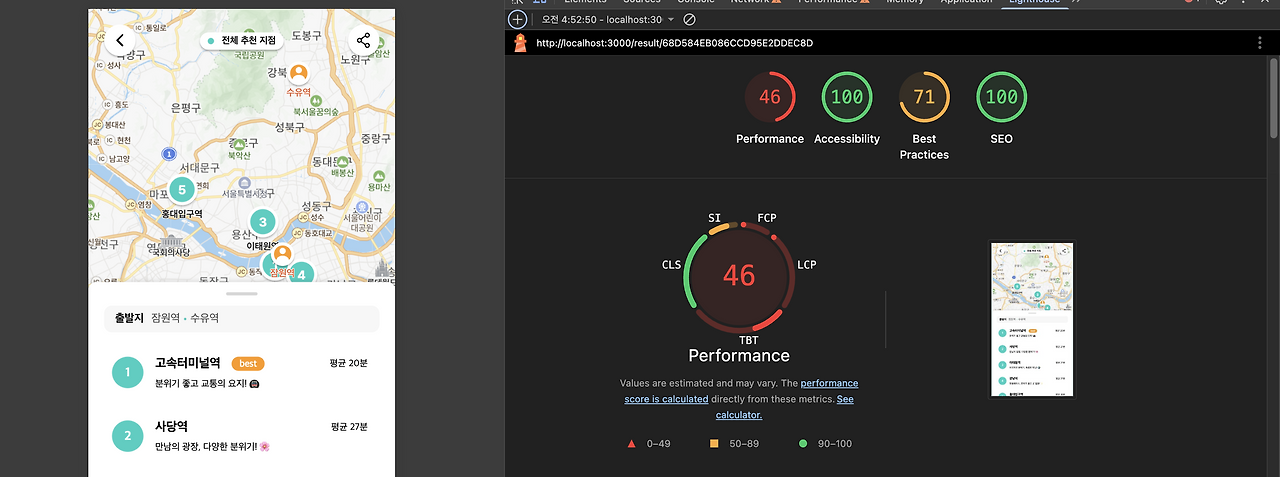
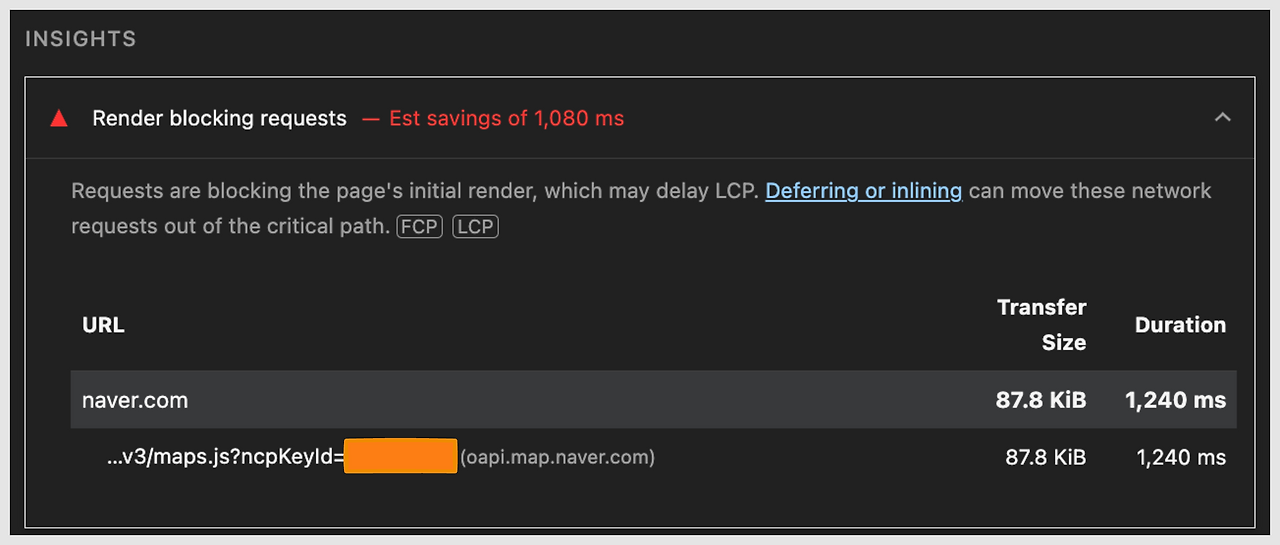
The main culprit was Lighthouse's Render blocking requests audit. The Naver Map API script blocked the initial render for 1,240 ms—about 1.2 seconds.
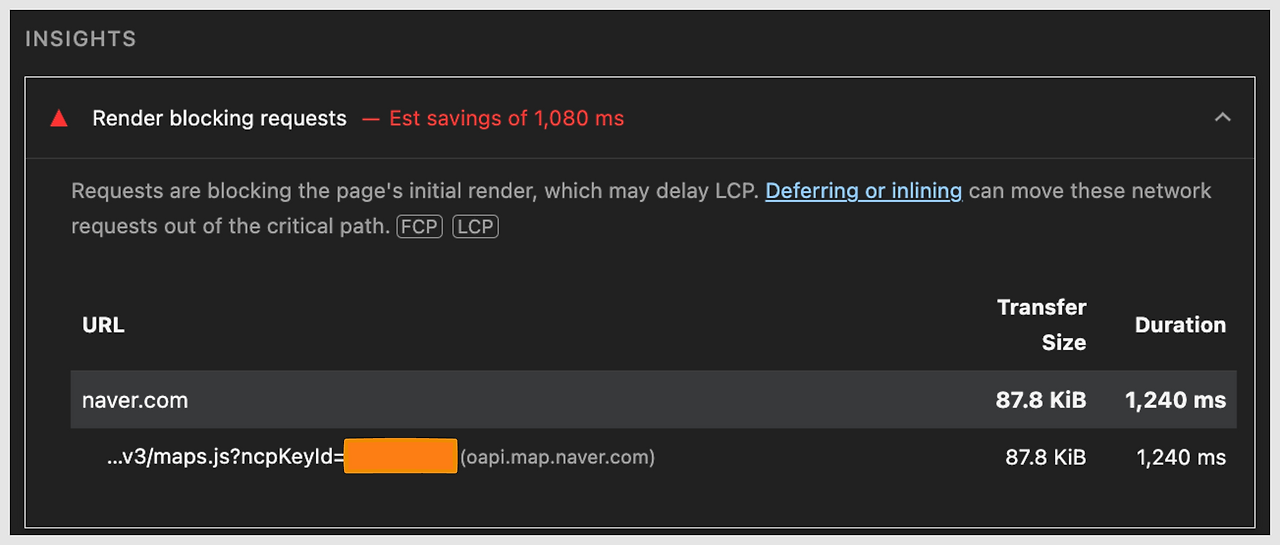
This post explains how we diagnosed the synchronous script blocking the initial render and improved the experience by switching to dynamic loading.
[WHY] A script blocking the Critical Rendering Path
The cause was clear: index.html loaded the Naver Map API synchronously.
The previous execution order was:
- The browser starts parsing HTML.
- It encounters a
<script>tag and immediately stops parsing HTML. - The Naver Map API script (87.8 KB) downloads and runs, creating
window.naver. - HTML parsing completes.
- The
DOMContentLoadedevent fires. - The React app starts (
main.tsx). IndexPagerenders.- The user navigates to
ResultPage. useCustomOverlaysuseswindow.naver.maps.
The problem was that this script blocked the Critical Rendering Path (CRP).
<!-- index.html: runs synchronously on every page -->
<script src="https://oapi.map.naver.com/openapi/v3/maps.js" type="text/javascript"></script>

<!-- Rendering is blocked until the 87.8 KB script downloads and executes. -->
<!-- An API used only by ResultPage is loaded globally. -->
In other words, the browser could not render the Map component until the global naver.maps object was ready.
Moitz has an IndexPage, which does not need a map, and a ResultPage, which does. The original structure still downloaded and executed the map API on IndexPage, delaying the initial load of routes unrelated to maps.
[WHAT] Dynamic loading: load it only when it is needed
We first removed the synchronous script tag from index.html. This moved the 1,270 ms blocking task and its 87.8 KB resource out of the initial path, while preventing unnecessary API loads on every route.
<!-- Removed -->
<!-- <script src="https://oapi.map.naver.com/openapi/v3/maps.js" type="text/javascript"></script> -->
We then needed to decide when to load the script. We compared three approaches:
asyncdefer- Dynamic loading
Both async and defer download scripts in parallel with HTML parsing. However, defer only postpones execution until parsing is complete; it still downloads the script on pages that do not need a map.
async also does not guarantee when the script will execute. A React component can therefore mount before window.naver is available, creating a race condition.
Dynamic loading creates the script tag with JavaScript and loads the API only when the user enters ResultPage. It gives us control over the loading point, supports conditional loading, and makes Promise-based error handling straightforward. It was the best fit for this requirement.
[HOW] Implementation
To keep the UI stable even when the map API arrives late or fails to load, we implemented detailed script-loading state management.
1. Naver Map API loader utility (loadNaverMapScript)
First, we created a utility that dynamically loads the script and returns the result as a Promise. It provides two guarantees.
Prevent duplicate loads
Do not create another script tag if window.naver.maps already exists or a script tag has already been inserted into the DOM.
Manage state with a Promise
Resolve on the script element's onload event and reject on onerror, making success and failure explicit.
// /utils/loadNaverMapScript.ts
export const loadNaverMapScript = (): Promise<void> => {
  return new Promise((resolve, reject) => {
    // Already loaded
    if (window.naver?.maps) {
      resolve();
      return;
    }

    // Check for an existing loading attempt to avoid duplicates
    const existingScript = document.querySelector(
      'script[src*="oapi.map.naver.com"]'
    );
    if (existingScript) {
      existingScript.addEventListener('load', () => resolve());
      existingScript.addEventListener('error', () => reject());
      return;
    }

    const script = document.createElement('script');
    script.src = `https://oapi.map.naver.com/openapi/v3/maps.js?ncpKeyId=${YOUR_API_KEY}`;
    script.async = true;
    script.onload = () => resolve();
    script.onerror = () => reject();
    document.head.appendChild(script);
  });
};
2. Loading-state hook (useNaverMapLoader)
Next, we built a custom hook so that the Map component could consume the API loading state easily. The hook manages three states: isLoading, isScriptLoaded, and errorMessage.
// /hooks/useNaverMapLoader.ts
export const useNaverMapLoader = () => {
  const [isScriptLoaded, setIsScriptLoaded] = useState(false);
  const [isLoading, setIsLoading] = useState(true);
  const [errorMessage, setErrorMessage] = useState<string | null>(null);

  useEffect(() => {
    const initializeScript = async () => {
      try {
        await loadNaverMapScript();
        setIsScriptLoaded(true);
      } catch (err) {
        setErrorMessage(err.message);
      } finally {
        setIsLoading(false);
      }
    };
    initializeScript();
  }, []);

  return { isScriptLoaded, isLoading, errorMessage };
};
3. Applying it to the Map component (loading and error UI)
The Map component renders a different UI for each state returned by useNaverMapLoader.
- While loading (
isLoading), it shows a skeleton UI. - On an error (
errorMessage), it shows fallback UI that informs the user and allows a retry. - After loading (
isScriptLoaded), it renders the actual map.
// /components/Map.tsx
function Map(...) {
  const { isScriptLoaded, isLoading, errorMessage } = useNaverMapLoader();

  if (isLoading) {
    return <Skeleton />;
  }
  if (errorMessage) {
    return <FallBackPage error={new Error(`Failed to load map: ${errorMessage}`)} ... />;
  }

  return <ActualMapComponent ... />;
}
4. Solving the CustomOverlay race condition
One issue remained: a race condition involving CustomOverlay. Naver Map's CustomOverlay extends window.naver.maps.OverlayView.
The old code defined that class at the top level of the module. The map script may not have loaded when the module is evaluated, so window.naver may be unavailable and cause an error.
// Problematic previous code
// Defining the class at the module top level can fail because window.naver
// is not available before the script loads.
class CustomOverlay extends window.naver.maps.OverlayView {
  // window.naver may not exist
}
We solved this with a factory function that defines the class at execution time, rather than when the module loads.
// createCustomOverlay.ts
export const createCustomOverlay = (props: CustomOverlayProps) => {
  // Verify once more that the API has loaded
  if (!window.naver?.maps?.OverlayView) {
    throw new Error('Naver Map API has not loaded.');
  }

  // window.naver.maps.OverlayView is guaranteed at this point
  class CustomOverlay extends window.naver.maps.OverlayView {
    // ... (CustomOverlay logic)
  }

  return new CustomOverlay(props);
};
[SO] Results
After removing the synchronous script and introducing dynamic loading, the execution flow changed as follows.
| Before | After |
|---|---|
| 1. Start parsing HTML | 1. Parse HTML (no blocking) |
| 2. Load and execute the Naver Map API (blocks for 1,270 ms) | 2. Start the React app immediately |
| 3. Finish parsing HTML | 3. IndexPage: do not load the map API |
| 4. Start the React app | 4. Dynamically load it only on entry to ResultPage |
| 5. Load the map API on every page | 5. Load the API asynchronously in the background |

The Lighthouse results improved as well.
IndexPage — Before
The Naver Map API script in index.html ran synchronously on every page, causing render blocking.
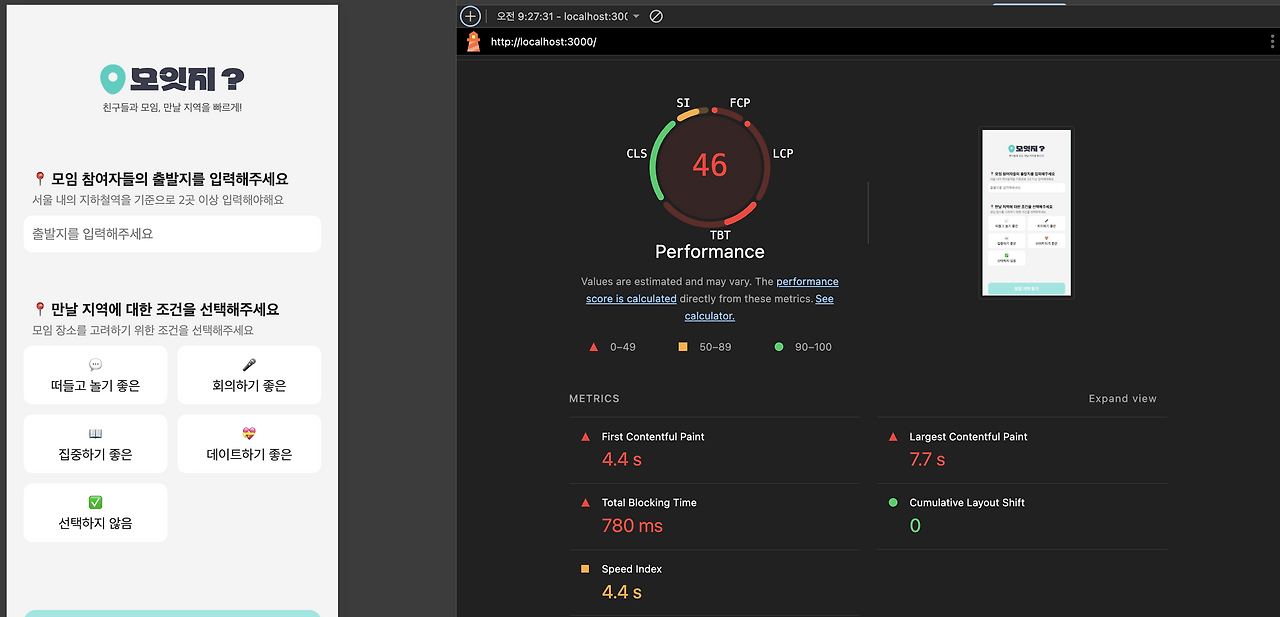
IndexPage — After
IndexPage does not need a map, so it no longer executes the script. As a result, the render blocking is gone.
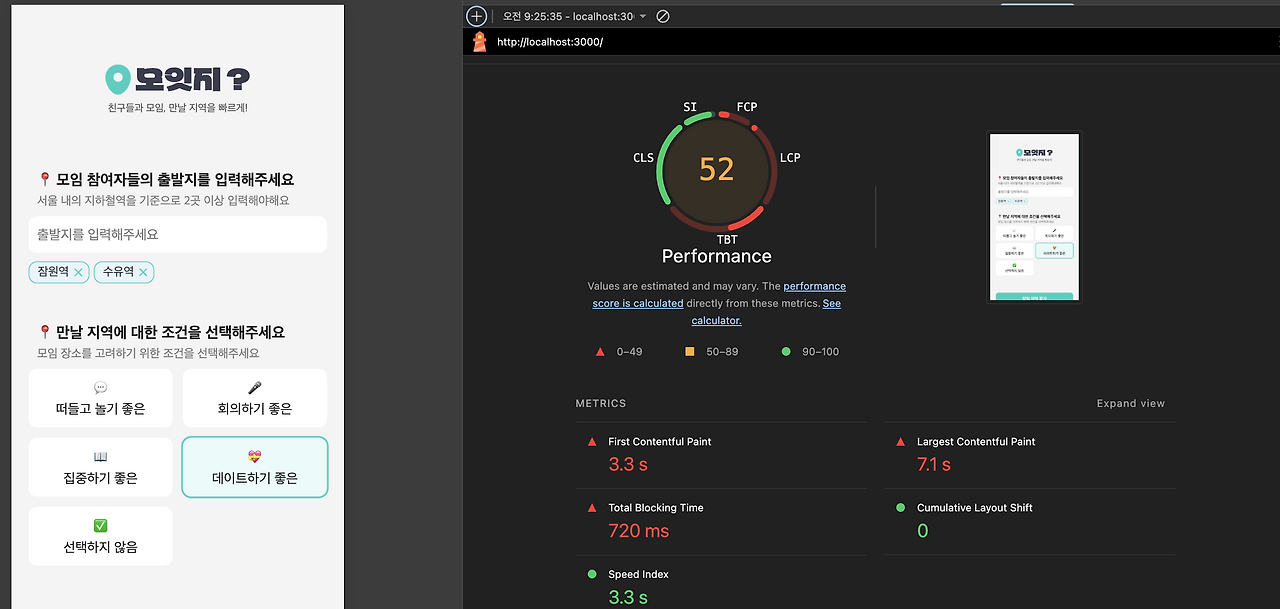
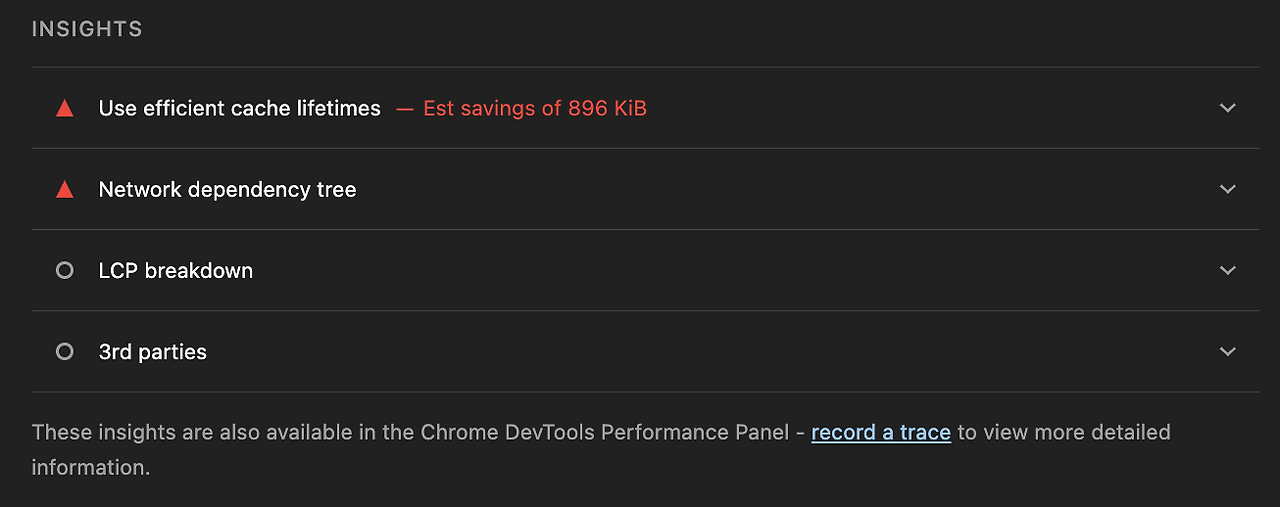
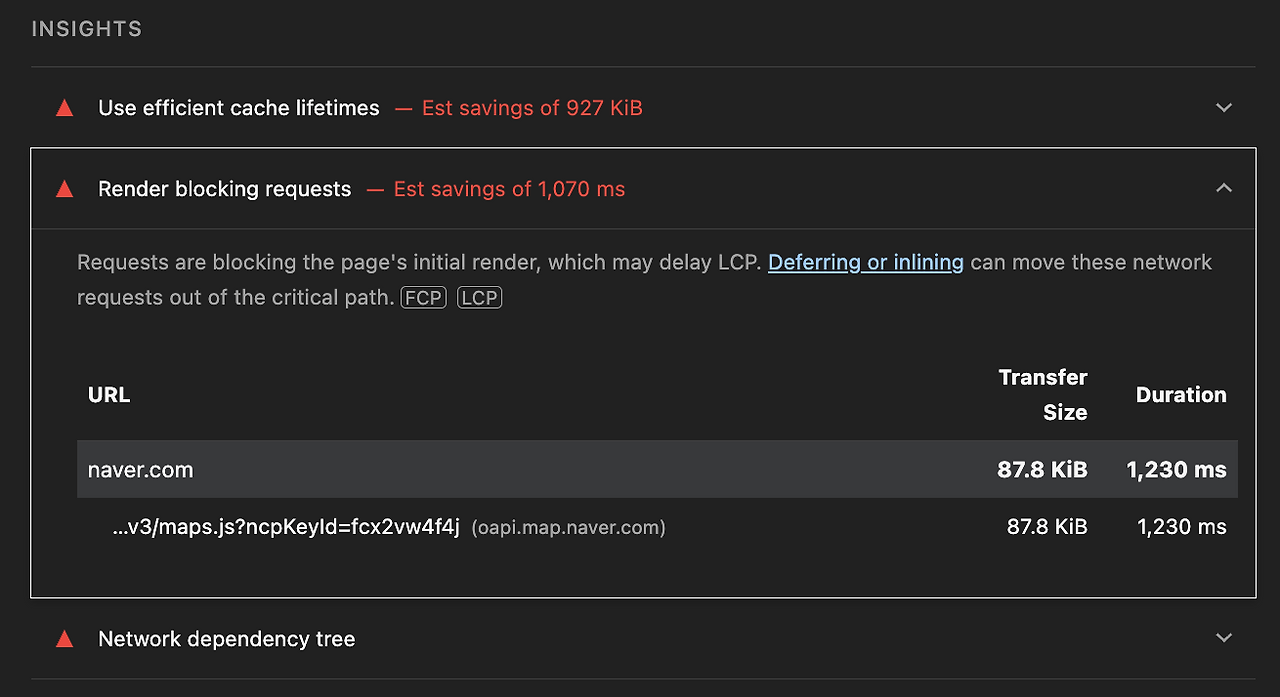
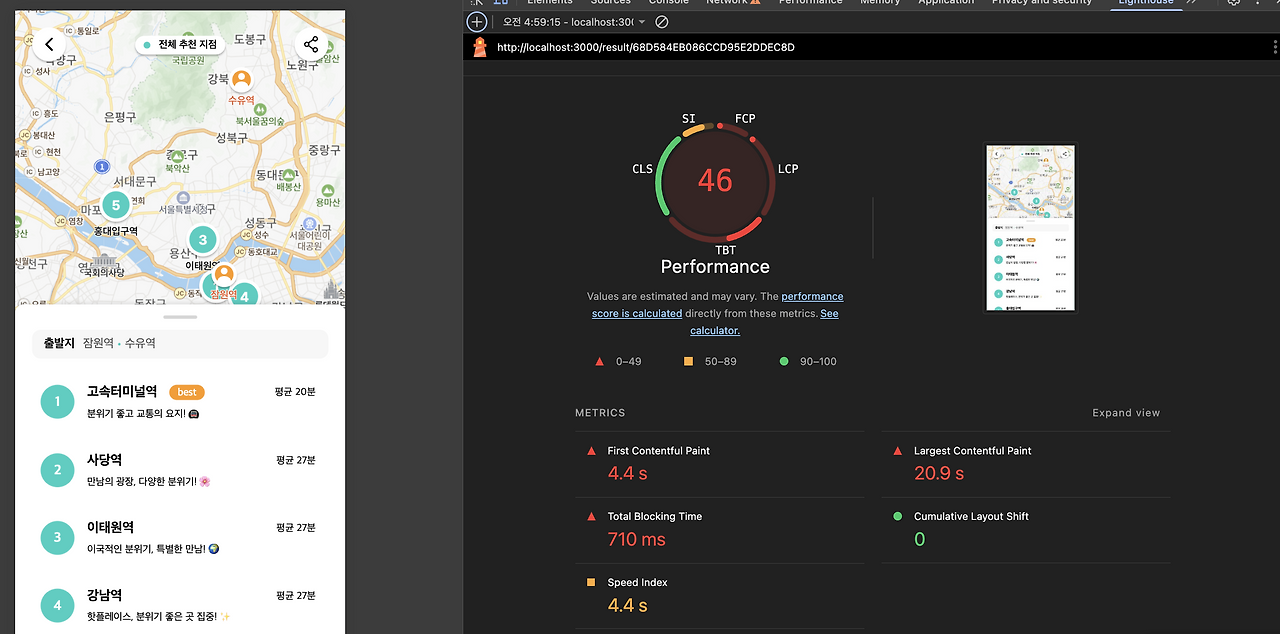
ResultPage — Before
ResultPage needs a map, but the synchronous HTML script blocked the Critical Rendering Path and delayed FCP to 4.4 seconds.
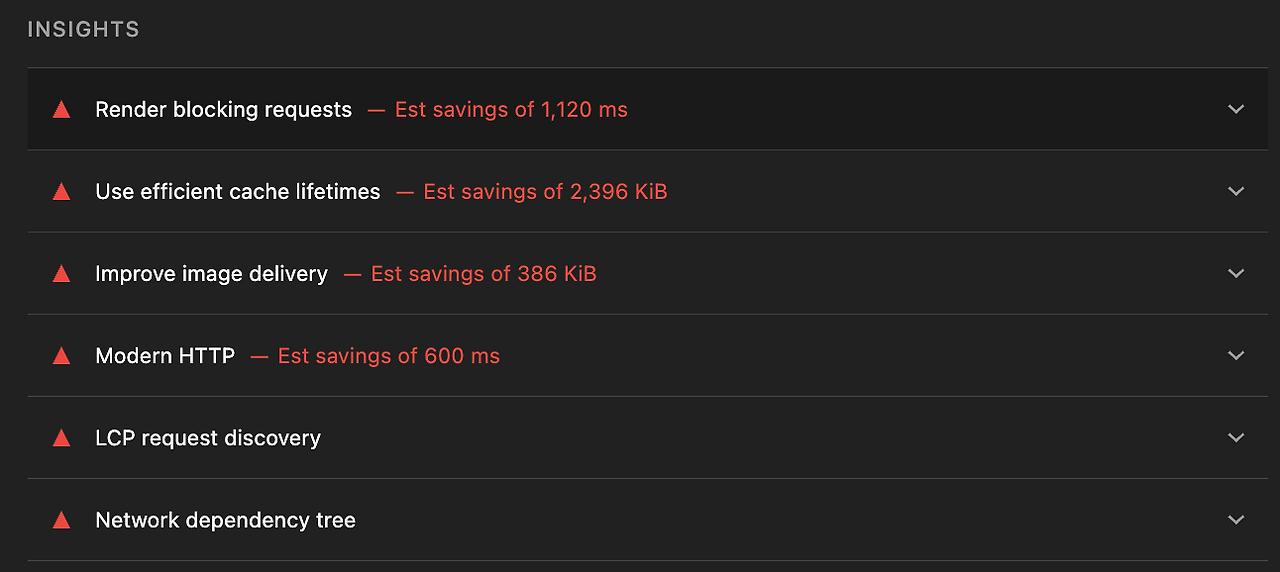
ResultPage — After
The map API now loads dynamically only when it is needed. FCP fell to 0.6 seconds, and the Performance score rose from 46 to 57.
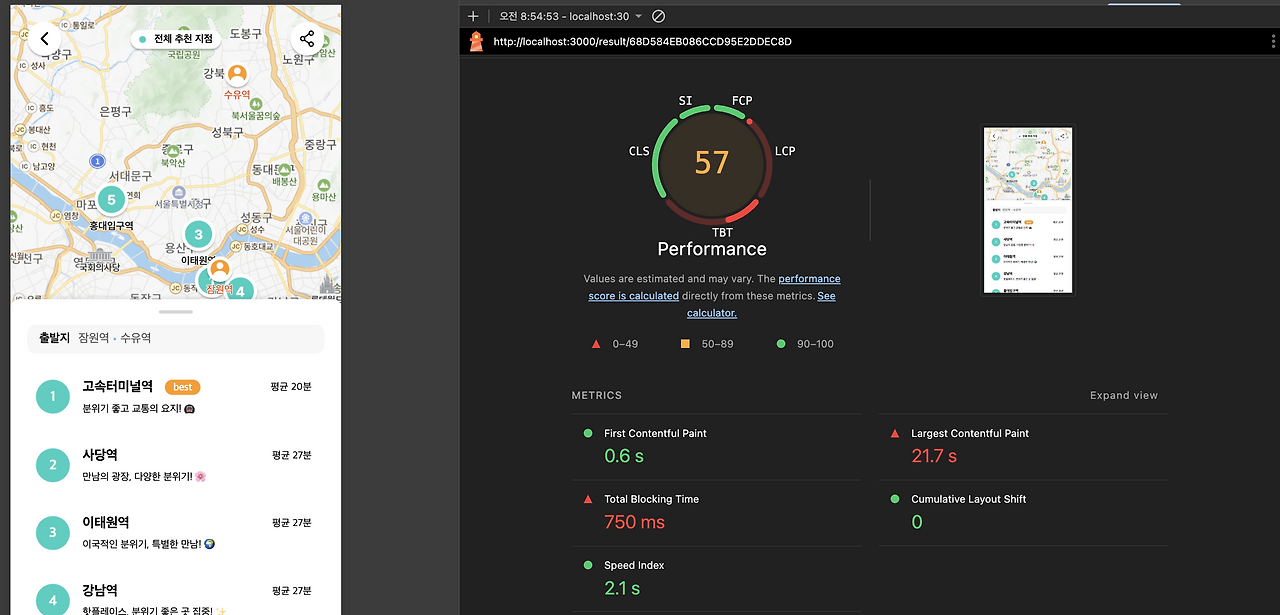
Removing render blocking from every page improved FCP. However, the script's execution time did not change, so TBT did not improve substantially.
Why TBT did not improve
TBT measures the time spent executing work on the main thread. The important question is not when a script downloads, but how long it occupies the main thread when it runs.
The Naver Map API still executes synchronously on the main thread. Longer parsing and execution increase TBT. async makes only the download asynchronous; execution still blocks the main thread.
As a third-party script, the Naver Map API has a few fundamental constraints:
- It is a third-party script, so we cannot optimize it directly.
- Its parsing and execution take a long time (200–300 ms).
- It requires DOM access, so it cannot run in a Web Worker.
To improve TBT, we would need to remove the script entirely or postpone its execution beyond the measurement window.
Closing
This work did more than improve a performance score; it also made the structure around the map feature clearer.
- Separation of concerns: Map-loading logic is encapsulated in
useNaverMapLoaderand the Map component. - Resource optimization: The API loads only on pages that need a map.
- Improved resilience: Error UI protects the user experience when loading fails.
Starting with Lighthouse's recommendation to remove render blocking, we reconsidered our resource-loading strategy. The result is a faster initial screen while keeping the map reliable on the page that needs it.